Page top

Lead Contents

SYSMAC CJ-series High-speed Counter Unit

CJ1W-CT021

CJ1W-CT021

High-Speed, Flexible Control With A Wide Array of Features

Primary Contents


General Specifications

ItemCJ1W-CT021
Unit typeCJ-series Special I/O Unit
General SpecificationsConform to general specifications for SYSMAC CJ-series
Ambient Operating Temperature0 to 55 ° C
Ambient Storage Temperature-20 to 75 ° C
Ambient Operating Humidity10% to 90% without condensation
Internal Current Consumption280 mA (at 5 V)
Dimensions31 × 90 × 65 mm (W × H × D)
Weight100 g
Mounting PositionCJ-series CPU Rack or CJ-series Expansion Rack (see Note 1)
Maximum Number of CT021
Units per Rack
Equal to the number of slots of the Rack (see Note 2)
Maximum Number of CT021
Units per basic CJ PLC
24
Data Exchange with CPU UnitI/O Refresh Data Area (CIO-bits 200000 to 255915, CIO-words 2000 to 2959): Note 3)
Special I/O Unit DM-Area (D-words 20000 to 29599): 400 DM-words per Unit are transmitted form
the CPU to the Unit at Power Up or when the Unit is restarted (see Note 4)

Note:

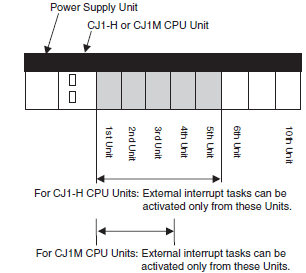
1.The Unit must be in one of the five positions immediately to the right of the CJ1-H CPU Unit or in one of the three positions immediately to the right of the CJ1M CPU Unit to activate external interrupt tasks. No external interrupt tasks can be activated if the Unit is in any other position (i.e., 6th Unit position or further away from the CJ1-H CPU Unit, or 4th Unit position or further away from the CJ1M CPU Unit), or if it is on a CJ-series Expansion Rack.

2.The maximum number of Units per Rack is also depending on the maximum supply current of the Power Supply Unit and the current consumption of other Units on the Rack.

3.The CJ1W-CT021 Special I/O Unit is allocated words for 40 words in the Special I/O Unit (CIO) Area.

4.The CJ1W-CT021 Special I/O Unit is allocated words for 4 Units in the Special I/O Unit DM Area. From the 400 DM words that are allocated, the first 113 words are used to make the DM-settings and the remaining 287 words can be used as work-words.

Functional Specifications

ItemCJ1W-CT021
Number of Counters2
Counter TypeSimple Counter
Circular Counter
Linear Counter
The Counter Type can be chosen by DIP switch at the front of the Unit. By default the Counters are set
to Simple Counter.
Maximum Input Frequency500 kHz
Maximum Response Time0.5 ms
Signals per CounterPhase A, B and Z
Digital I/O2 Digital Inputs (I0 and I1):
Every Digital Input can be assigned to a Counter. In this way one Counter can be controlled by a
maximum of 2 Digital Inputs.
2 Digital Outputs (O0 and O1):
The Unit Output Pattern represents the 2 Digital Outputs and 30 Soft Outputs.
Input Signal TypesPhase Differential (multiplication × 1), (multiplication × 2) *1 and (multiplication × 4) *1
Up/Down *1
Pulse & Direction *1
Counter Control using
CIOsoftware bits
Open Gate/Start Counter: Counter is enabled to count pulses
Close Gate/Stop Counter: Counter is disabled to count pulses
Preset Counter: Preset Value can be set in CIO
Reset Counter to zero
Capture Counter Value: Captured Counter Value can be read using IORDinstruction
Digital Input FunctionalityGate *1
Reset *1
Preset *1
Capture *1
Stop/Capture-Continue *1
Stop/Capture-Reset/Continue *1
Capture/Reset *1
Enable Reset *1
Disable Reset *1
For every Function the corresponding action can be triggered on a rising- or on a falling edge.
Output Control ModeAutomatic Output Control in:
Range Mode *1
Comparison Mode *1
Rate Range
Manual Output Control
Output State ControlOn changing the Operating Mode of the PLC from RUN/MONITOR → PROGRAM, an I/O Bus Error or an
Overflow/Underflow Error, the Digital Outputs can be configured to:
Continue automatic updating Output States
Freeze Output States *1
Predefine Output States *1
Output Driver ConfigurationThe Output Driver of every Digital Output can be configured as:
NPN
PNP *1
Reset SignalsEvery Counter can be reset to zero by (a combination of) the following sources:
Software Counter Reset Bit
Digital Input *1
Z-Input *1
Extra FunctionsProgrammable Output Pulse *1:
To every Digital Output an ON-delay and/or a Pulse Duration [1 to 9999 ms] can be applied.
Rate Measurement *: For every Counter the Pulse Rate can be measured by defining a Time-Window
[1 to 9999 ms]. Up to a maximum of 64 Rate Values are stored in the Rate History Log File. Rate Values
from the Rate History Log File can be read using the IORD-instruction. Additionally for every Counter
two Rate Ranges can be defined that control the Outputs according to the measured Rate Value.
Hysteresis *1: To prevent Outputs from being switched On and Off by very small fluctuations in the
Counter Value around Range Limits, for every Counter an Hysteresis-value [1 to 255] can be defined
(the Unit must in Range Mode).
Noise Filtering Counter Inputs
and Digital Inputs
To suppress noise on the signal lines of the Counter Inputs (A and B) and the Digital Inputs (I0 and I1) a
Noise Filter can be configured:
10 kHz *1
50 kHz (default)
500 kHz *1
For the Digital Inputs the 500 kHz filter can not be selected. The Z-Input Signals of every Counter are
filtered with a fixed Noise Filter of 1 kHz.
Initial Counter ValueThe Initial Counter Value *1 is transferred to the Unit when the Unit is Powered Up or Restarted. The
Initial Counter Value is very useful to overcome problems in case of power failure.
IORD- and IOWR-instructionsRun-time *3 configuration and operation of the High-speed Counter Unit is possible by using IORD- and
IOWR-instructions. The following data can be read or written:
DM-configuration data *1
Range- and Comparison Data *1
Captured Counter Value
Rate History Log File Data *1
Counter Value
(Re) Configure High-speed Counter Unit *1
Error Clear
Interrupts of OutputsThe Digital Outputs and the Soft Outputs of the Unit Output Pattern can all be configured to generate
interrupts to the CJ1-H/CJ1M CPU Unit *1 *2.
Interrupts of Digital InputsThe Digital Inputs can all be configured to generate interrupts to the CJ1-H/ CJ1M CPU Unit *2.
Error History Log FunctionStores up to 30 error log records

*1.This specification item is only supported for Circular and Linear Counters (not for Simple Counters).

2.To activate external interrupt tasks, a CJ1-H or CJ1M CPU Unit must be used. CJ1 CPU Units do not support external interrupt tasks. To activate external interrupt tasks in a CJ1-H CPU Unit, the CJ1W-CT021 High-speed Counter Unit must be in one of the five positions immediately to the right of the CJ1-H CPU Unit. For CJ1M CPU Units, the CJ1W-CT021 High-speed Counter Unit must be in one of the three positions immediately to the right of the CJ1M CPU Unit. No external interrupt tasks can be activated if the Unit is in any other position (i.e., 6th Unit position or further away from the CJ1-H CPU Unit, or 4th Unit position or further away from the CJ1M CPU Unit), or if it is on a CJ series Expansion Rack.

CJ1W-CT021_Spec2

3.If an IOWR- or IORD-instruction is used during operation, comparison will stop during instruction execution. Care must be taken, therefore, with the timing of executing instructions.

Input Specifications

ItemCounter Inputs A and BDigital Inputs
(I0 and I1)
Input Voltage24 VDC
(19.6 to 26.4 V)
12 VDC
(9.8 to 13.2 V)
5 VDC
(4.5 to 5.5 V)
Line Driver24 VDC
(19.6 to 26.4 V)
Input Current (typical)8 mA8 mA7 mA11 mA
Connectable to RS-422 compatible
Line Drivers.
7.6 mA
ON Voltage (min.)19.6 V9.8 V4.5 V19.6 V
OFF Voltage (max.)4 V2.5 V1.5 V4 V
ItemCounter Input Z
Input Voltage24 VDC (18.6 to 26.4 V)12 VDC (9.8 to 13.2 V)5 VDC (4.5 to 5.5 V)Line Driver
Input Current (typical)7.3 mA6.6mA6 mA11 mA
Connectable to RS-422 compatible
Line Drivers.
ON Voltage (min.)18.6 V9.8V4.5 V
OFF Voltage (max.)4 V2.5V1.5 V

Note:

1.The Counter Inputs (A, B, Z) are insulated from each other and from the Digital Inputs. The Digital Inputs are also insulated from each other. All Counter Inputs and Digital Inputs are reverse polarity protected and insulated from the I/O-bus.

2.A noise filter can be configured (10 kHz or 50 kHz (default)) for the Digital Inputs. Every Z-Input has a defined noise filter of 1 kHz.

3.If the 50-kHz noise filter is configured for External Control Inputs, signals of 10 μs or longer can be read.

Counter Inputs A, B, Z and Digital Inputs
5/12/24V input signalsRS-422 Line Driver signals
Counter inputs A and B
Input pulses with a duty factor of 50%


Relationship between A and B phases with phase
differential inputs


Counter Input Z */Digital Inputs (24 V)


*Maximum allowed frequency of Z-pulses is 1 kHz
Counter inputs A and B
Input pulses with a duty factor of 50%


Relationship between A and B phases with phase
differential inputs


Counter Input Z *


* Maximum allowed frequency of Z-pulses is 1 kHz
Filter SelectionTiming requirement (μs)
ABCDEFGHIJ
10 kHz<3>50>100>23>10>100>50>100>23>10
50 kHz<3>10>20>4.5>10>20>10>20>4.5>10
500 kHz----->2>1>4>1>10

Note:As a general guideline it can be stated that if you want the timing requirements for the Counter Inputs to satisfy the above mentioned specifications, you must pay attention to the type of output driver of the encoder being used, the length of the encoder cable and the frequency of the count pulses generated. For example, if you use an Open Collector encoder (e.g. E6B2-CWZ6C) at 24 V with 10 m cable, you can typically generate count pulses up to 20 kHz. Therefore, if you want to generate count pulses with higher frequencies, you should use a different type of encoder (e.g. E6B2-CWZ1X with Line Driver output or a fast push-pull 24 V encoder, e.g. E6C2-CWZ5GH) or reduce the length of the encoder cable.

Output Specifications

ItemSpecification
Driver TypeOpen Collector (NPN/PNP selectable)
Operating Voltage Range12 to 24 V (10.2 to 26.4 V) 30 mA max. at 26.4 VDC (for PNP output, without load current)
Maximum Switching Capacity46 mA at 10.2 V to 100 mA at 26.4 V (200 mA maximum/common) (see picture below)
Minimum Switching Current5 mA
Output ON-delay100 μs max.
Output OFF-delay100 μs max.
Leakage Current0.1 mA max.
Residual Voltage1.5 V max.
Short Circuit ProtectionNo

Note:

1.Every Digital Output has 2 Output drivers available: NPN and PNP (available as separate pins on the front connectors). Every Output can be separately (DM-) configured for NPN or PNP. By default the Outputs are configured as NPN-output.

2.The Digital Outputs are insulated from the I/O-bus but not from each other. They are not short circuit protected.

3.The Output current must not exceed 200 mA per common (i.e. per 2 Digital Outputs) otherwise the unit will be damaged.

4.The Outputs can be automatically or manually controlled (DM-setting) by using Manual Output Control in CIO.

5.The state control of the Outputs, in case the operating mode of the PLC-CPU is changed from RUN/MONITOR → PROGRAM, an I/O Bus error or an Overflow/Underflow error occurs, can be configured.

Maximum Switching Capacity

The maximum switching current depends upon the power supply voltage, as shown below.

CJ1W-CT021_Spec8

Caution: In the interenst of product improvement, specifications are subject to change without notice.