

Page top

Primary Contents


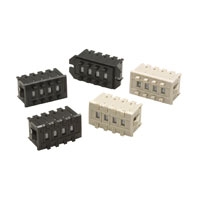
Switches (Single Switch Units)

ModelA7CN
Classification
(See note 1.)
Screw mounting (back mounting)
Snap-in (front mounting)
Output code numberPCB terminals
Light grayBlackLight grayBlack
06 (binary coded decimal)---A7CN-106-1A7CN-206A7CN-206-1

ModelA7CN-L
Classification (See note 1.)Snap-in (front mounting)
Locking type
Output code numberPCB terminals
Light grayBlack
06 (binary coded decimal)A7CN-L206A7CN-L206-1

Note:
1. The classification diagrams show 4 Switch Units combined with End Caps to create 4-digit displays.
2. The model numbers given above are for Switch Units.
3. Models with +, - displays can also be produced. Add "-PM" after the "206" in the model number (e.g., A7CN-206-PM or A7CN-206-PM-1).

Accessories (Optional)

Use accessories, such as End Caps and Spacers, with the Switch Units.

ClassificationScrew mounting
(back mounting)
Snap-in (front mounting)
ColorBlackLight grayBlack
End Caps (1 pair)A7CN-1M-1 *A7CN-2M *A7CN-2M-1 *
SpacerA7CN-1P[]-1 (See note.)A7CN-2P[] (See note.)A7CN-2P[]-1 (See note.)

Note:
The [] in the Spacer model number stands for a letter in the range A to U. (Refer to the table in the following explanation about Spacers.)
* The minimum ordering unit is 10.

End Caps

End Caps are used on the Switch Units at each end and allow all the Switch Units to be securely mounted to a panel. They come in pairs, one for the left and one for the right.

Spacers

Spacers are used for creating extra space or gaps between the Switch Units and have the same dimensions as the Switch Units themselves.
There are also Spacers with engraved characters or symbols that can be used for indicating units, such as time and length. (Refer to the following table.) Consult your OMRON representative for details.

SymbolABCDEFG
StampNo designationSECMINHgkgmm

SymbolHJKLQTU
Stampcmm°CPCSx10SEC0