

 Global
Automatically searches, downloads, and assigns IODD files from over 100 manufacturers.
GD Series
IO-Link Master Unit
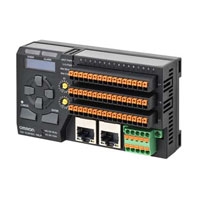
Empowering engineers by simplifying sensor communication

Software Download
You can download and install Support software Wave Inspire HUB.
Related Contents
- Special Contents
- Features
- Lineup
- Specifications
- Dimensions
- Catalog
last update: March 9, 2026
[Making design easy] Auto‑connect to devices from over 100 manufacturers Instantly usable sensor data
Just wire and power on to instantly monitor the status of various sensors. [Patent pending]*1
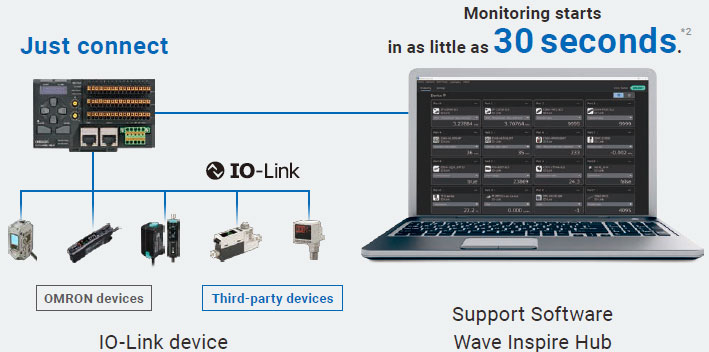
OMRON’s unique easy connection function
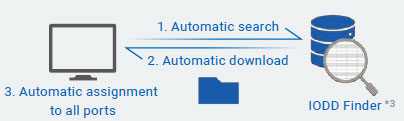
*Note: Easy automatic connection requires an internet-connected PC and powered devices.
In such cases...
Want to start designing even though the IO-Link master unit or devices are not yet available
You can do it even without actual devices.
Unable to connect the PC to the internet during on-site commissioning
If you download the IODD files in advance to a specified folder on your PC, you can connect without any issues.
*1. “Patent pending” and “Patented” refer to patent status in Japan (as of January 2026).
*2. Estimated time under OMRON-specified conditions. Actual time may vary depending on the number of connected devices and internet environment.
*3. This service is provided by the IO-Link Community.
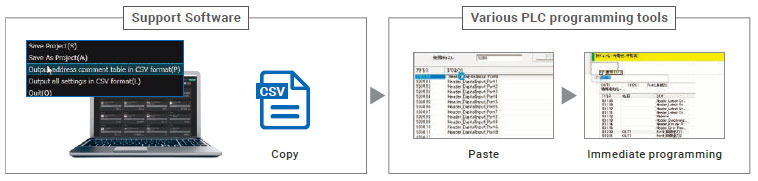
Automated Generation of "Address Comment Tables" for easy PLC Communication
Replace hours of manual reading and debugging with simple copy-and-paste.
You can easily see which IO-Link device’s process data is assigned to each address.
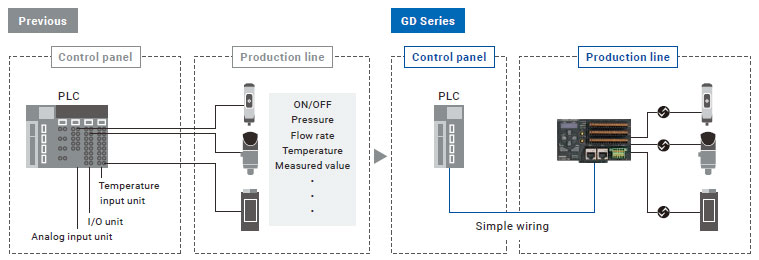
Simple wiring without input units
Previously, ON/OFF signals and analog signals were transmitted using separate wiring and I/O units. Now, they can be consolidated into a single communication master unit. This simplified wiring reduces both design and wiring time.
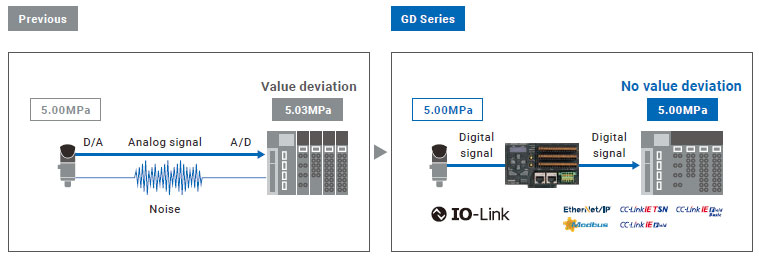
Easily obtain accurate data
Digital data transmission eliminates A/D and D/A conversion errors, removing the need for noise countermeasures and scaling. Data can be easily collected.
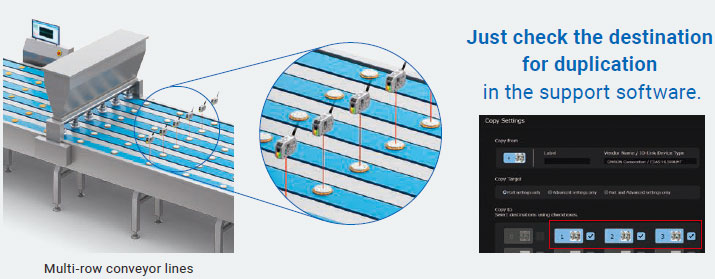
[Making startup easy] No manual configuration required Quickly duplicate settings across multiple sensors
Copy the sensor settings with one click
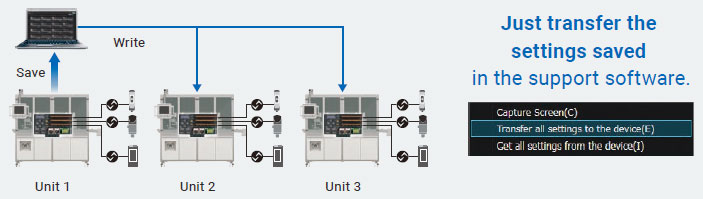
One‑click transfer of sensor and master unit settings
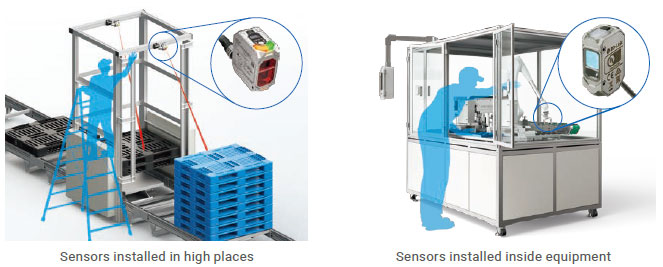
Even sensors in hard-to-reach places can be configured from the support software
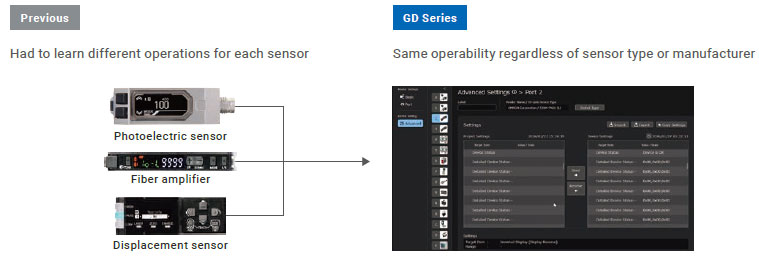
Easy-to-use, unified setting menu
Previously, you had to remember the menu hierarchy and button layout for each sensor, but now you can operate all sensors with the same interface, regardless of sensor type or manufacturer.
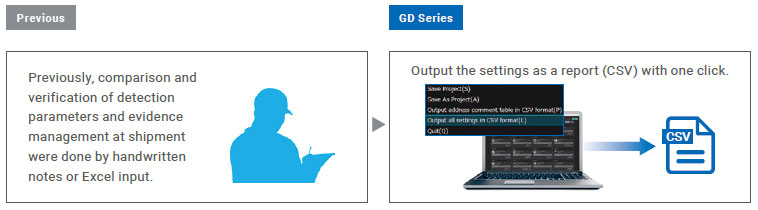
Automatic output of setting reports
The configured data can be output as a report. This makes it easy to compare and verify detection parameters and manage evidence at shipment, which previously required handwritten notes or Excel input.
Set thresholds while viewing graphs.*1
Measurement values can be displayed as a time trend graph, allowing you to set thresholds while viewing the graph.
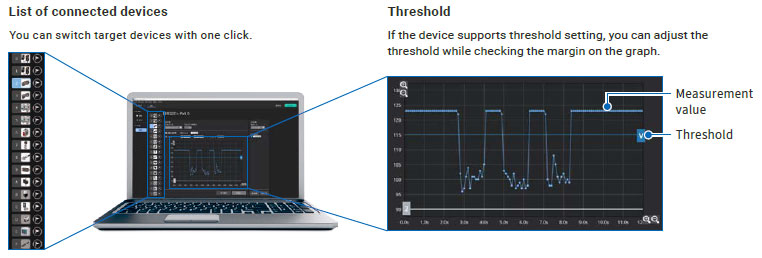
*1. These will be supported in a future version upgrade.
[Making maintenance easy] Quick recovery in the event of trouble Prevent issues in advance by leveraging data
Backup sensor settings to the GD unit for each sensor – quick recovery with just replacement and startup
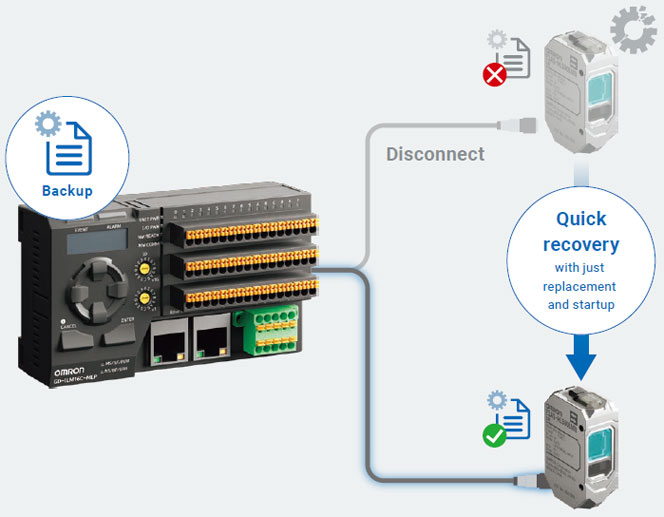
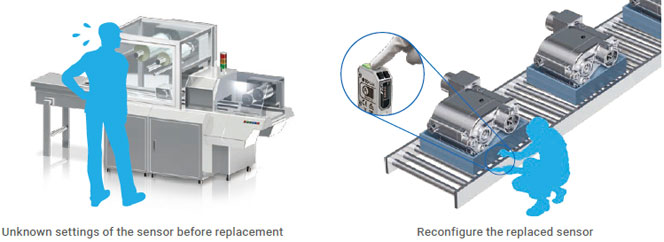
In such cases...
Previously, it took a lot of time to recover from sensor failures.
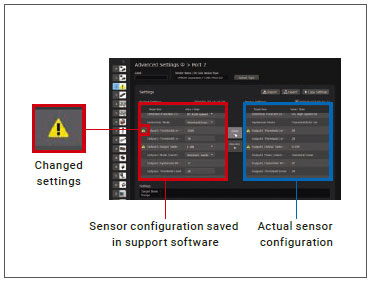
Easily identify and restore changed items [Patent pending]*1
You can compare the initial startup settings saved in the support software with the current sensor settings.
Any differences from normal conditions are immediately highlighted. If an unintended setting change is detected, it can be restored with a single click.
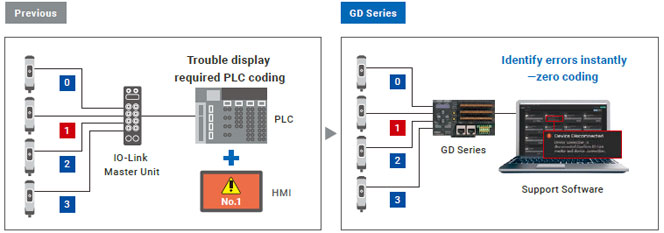
Quickly identify causes during troubles
With the GD series, you can instantly identify errors or faulty sensors. You can immediately start recovery work, greatly reducing downtime.
Take preventive measures before malfunctions
By managing not only ON/OFF signals but also numerical data such as sensor incident level with the support software, you can detect sensor contamination and build a predictive maintenance system.
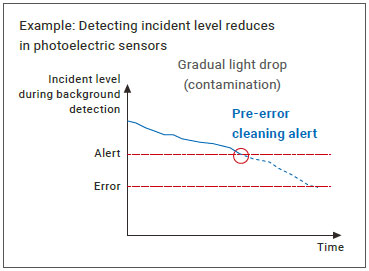
*1. “Patent pending” and “Patented” refer to patent status in Japan (as of January 2026).
Compact design supporting 16-channel connection IO-Link Master Unit GD Series
[Smallest in its class] Half the space compared to conventional models*1
Achieves approximately half the size (W110×D31.4×H63mm) of a typical 8-channel IO-Link master.
Furthermore, with double the number of channels (16ch), it contributes to space saving inside equipment.
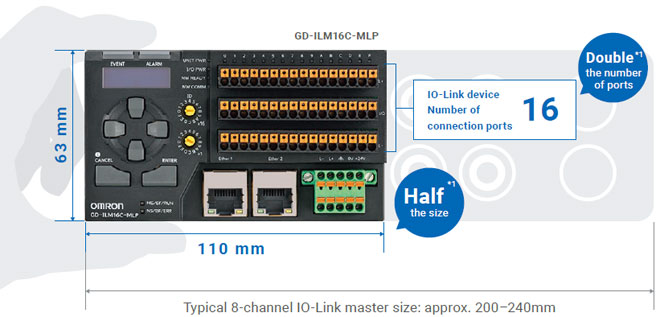
*1. Compared to the size of a typical 8-channel IO-Link master (according to OMRON investigation in January 2026).
Compatible with a wide range of field networks, easily connectable to familiar PLCs
IO-Link master unit lineup
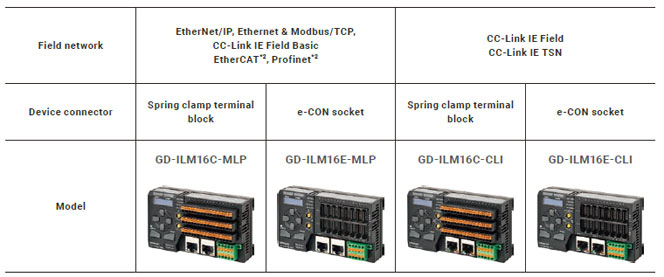
*2. These will be supported in a future version upgrade.
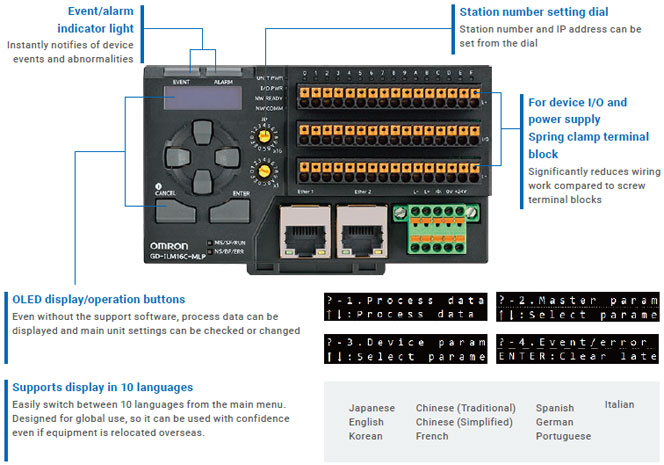
Display and operation panel usable even without a PC
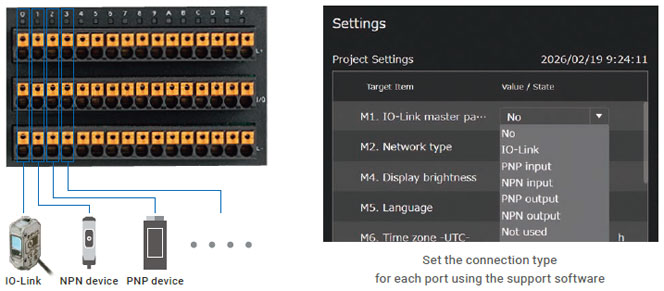
Not only IO-Link devices, but also mixed connection of NPN/PNP devices is possible
The type of I/O connection can be set for each port, allowing effective use of unused ports.
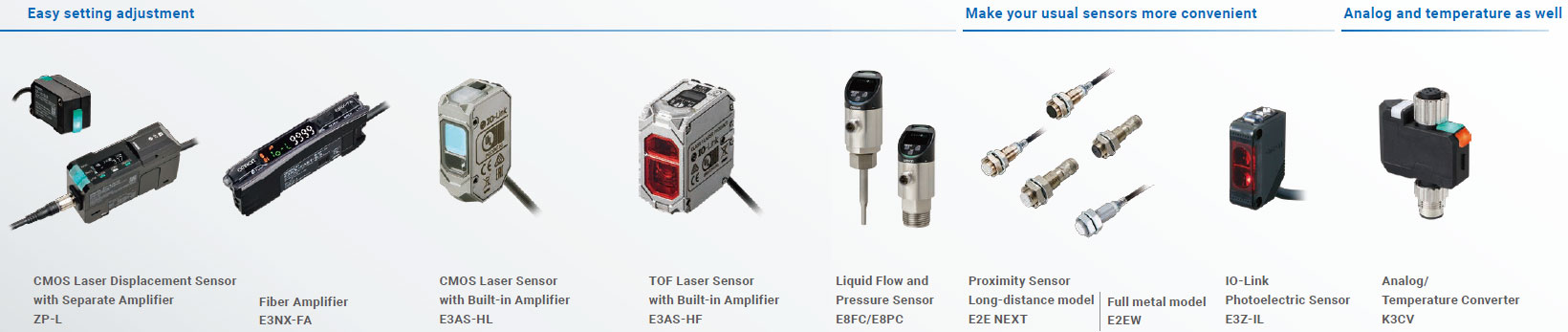
OMRON IO-Link device
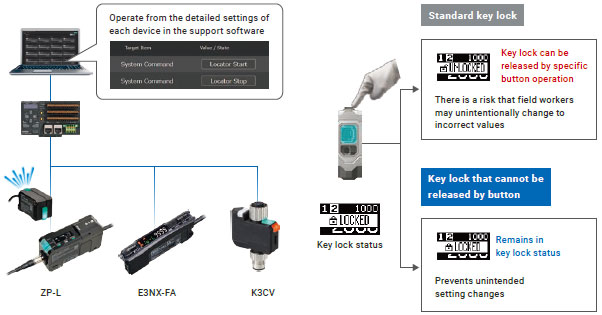
Three features for safe and secure use
Locator function to identify pairing [ZP-L] [E3NX-FA] [K3CV]
When a command is sent from the support software, the indicator light on the connected device blinks, making it easy to identify which device is connected at a glance.
Key lock function that cannot be released by button operation [ZP-L] [E3NX-FA] [E3AS-HF]
Key lock can be enabled via IO-Link command, making it impossible to release by button operation.
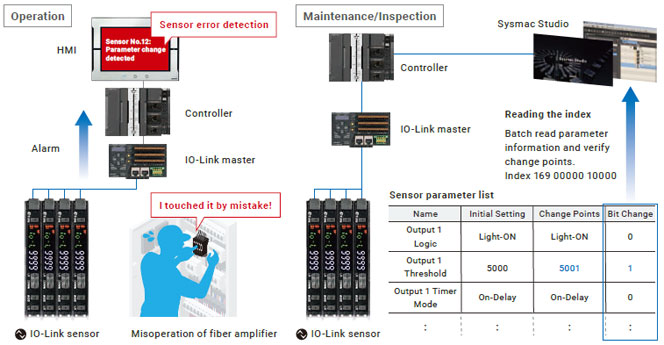
Smart verify function that notifies the PLC of setting changes [ZP-L] [E3NX-FA] [Patent pending]*1
The sensor outputs alarms for parameter changes and unintended setting modifications, enabling immediate detection of abnormalities.
*1. “Patent pending” and “Patented” refer to patent status in Japan (as of January 2026).
last update: March 9, 2026
 Top of Page
© Copyright OMRON Corporation 2007 - 2026. All Rights Reserved.